
To set up your Patrick Internet mailbox on an Apple iPhone or iPad, follow this guide:
Please note that all passwords in these screen shots, show as blank.
1) Locate Settings and tap the icon
2) Locate the Passwords & Accounts option, and tap it.
3) Scroll down and tap 'Add Account'.
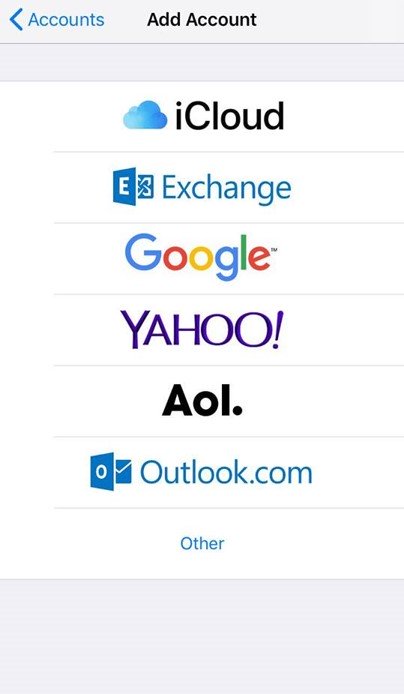
4) Select Other from this list.
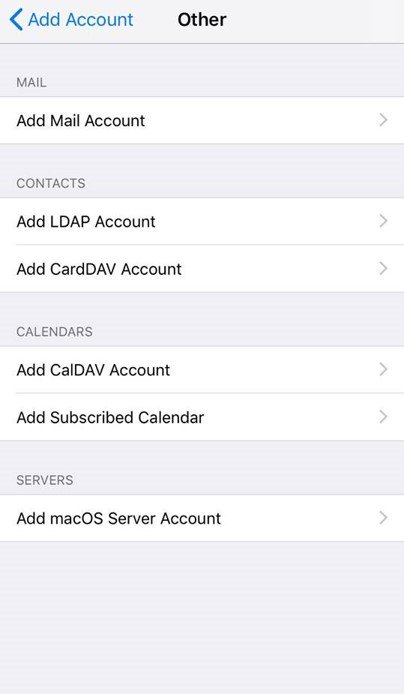
5) Select Add Mail Account.
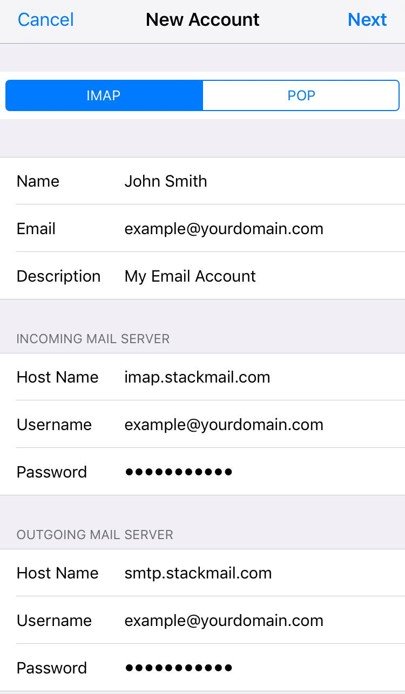
7) Input your mailbox information:
Name: Anything
Email: example@yourdomain.com
Password: Mailbox Password
Description: Work, Business...etc
8) Tap Next
9) Add the IMAP settings as follows (your username will be your email address):
Incoming Mail Server
Host Name: imap.stackmail.com
Username: example@yourdomain.com
Password: Mailbox Password
Outgoing Mail Server
Host Name: smtp.stackmail.com
Username: example@yourdomain.com
Password: Mailbox Password
10) Tap Next, and if all your information is correct, you'll see ticks alongside each setting
11) When presented with a save screen, tap Save and exit the settings
That's it! Your mailbox should work. Open your mail client and try sending an email to someone, and ask them to reply.
Troubleshooting - Can't Send Emails
A) Find the new account and tap it
B) Under IMAP, tap the new account
C) Scroll down and under OUTGOING MAIL SERVER, tap SMTP.
D) Tap on smtp.stackmail.com, under PRIMARY SERVER
E) Check and ensure your settings are all correct.